
Overall rating:
4.4/5
Good
DocSend
Free trial: 7 days
Ease of use
Average 4.1
Customer Support
Average 3.9
Ease of setup
Average 4.2
Global rankings
Docsend virtual data room software:
the complete guide
Docsend is a secure virtual data room featuring real-time tracking, granular access controls, and page-level content analytics. These capabilities streamline transactions from pitch to signature across industries.
Acquired by Dropbox in 2021, Docsend improves Dropbox’s cloud storage with advanced document security and insights. This integration allows businesses to manage sensitive documents efficiently and maintain full control over access and engagement.
Trusted by over 34,000 companies worldwide, DocSend enables teams to make data-driven decisions during fundraising, mergers and acquisitions, and other sensitive transactions. Its advanced features ensure that confidential information remains protected throughout the deal lifecycle. With user-friendly drag-and-drop features and auto-indexing capabilities, DocSend simplifies the management of unlimited data rooms, allowing financial teams and other stakeholders to focus on closing business deals faster.
By consolidating multiple features into a single platform, DocSend streamlines due diligence processes and offers a competitive edge in managing deals across different stages.
Software screenshots
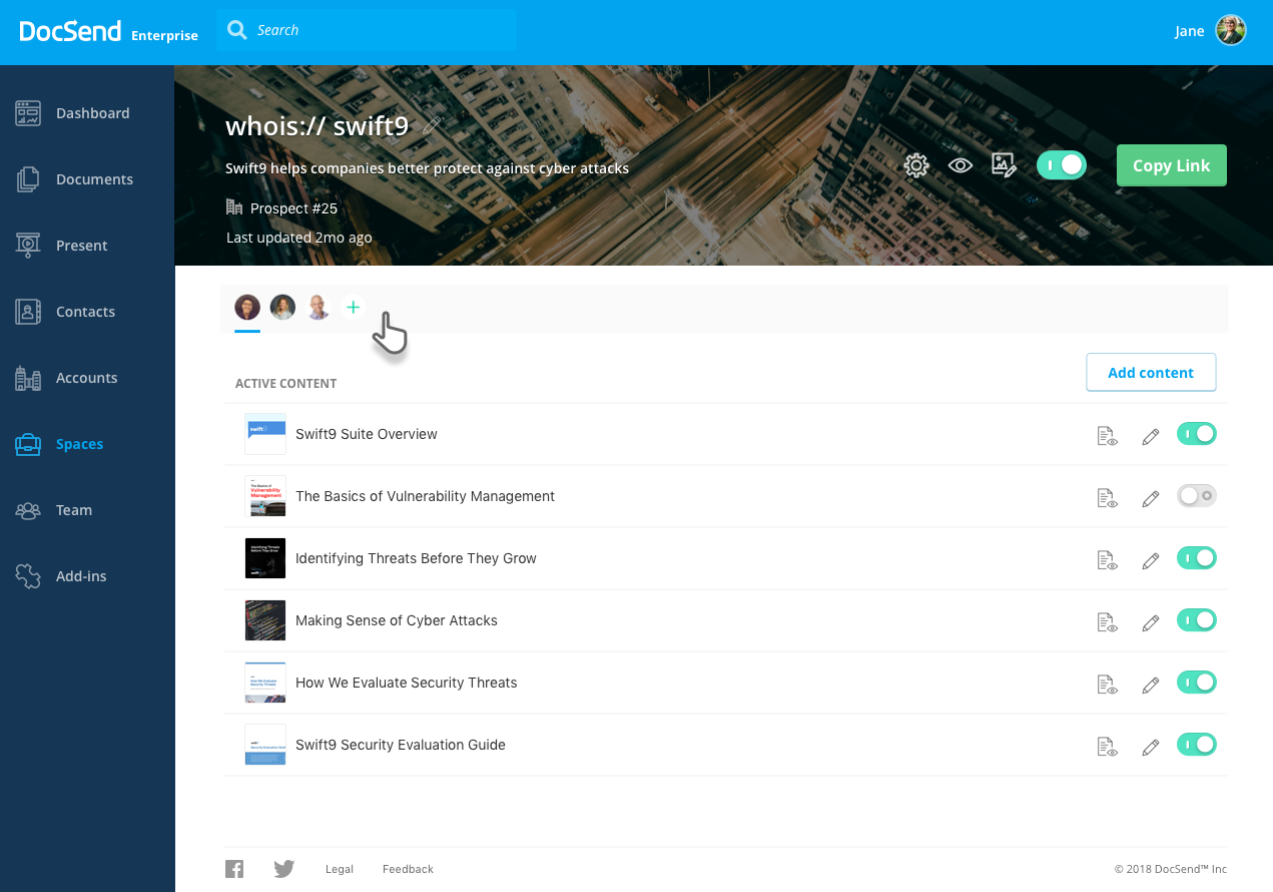
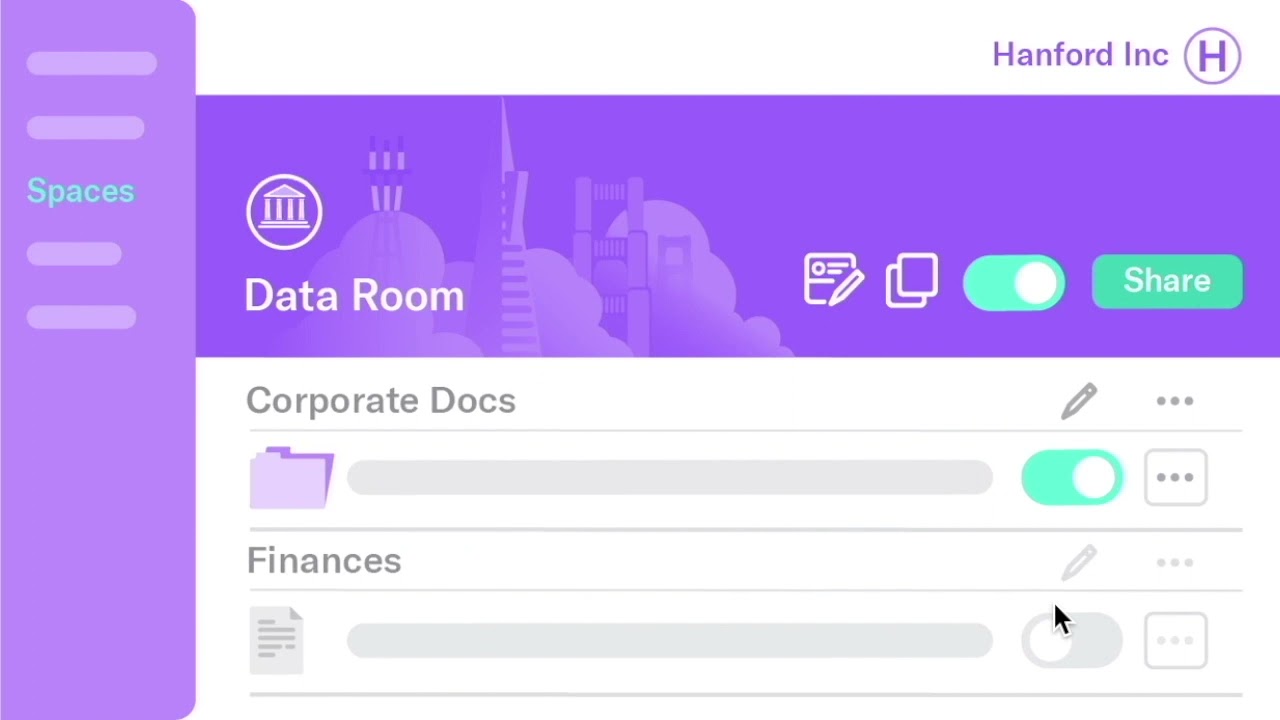
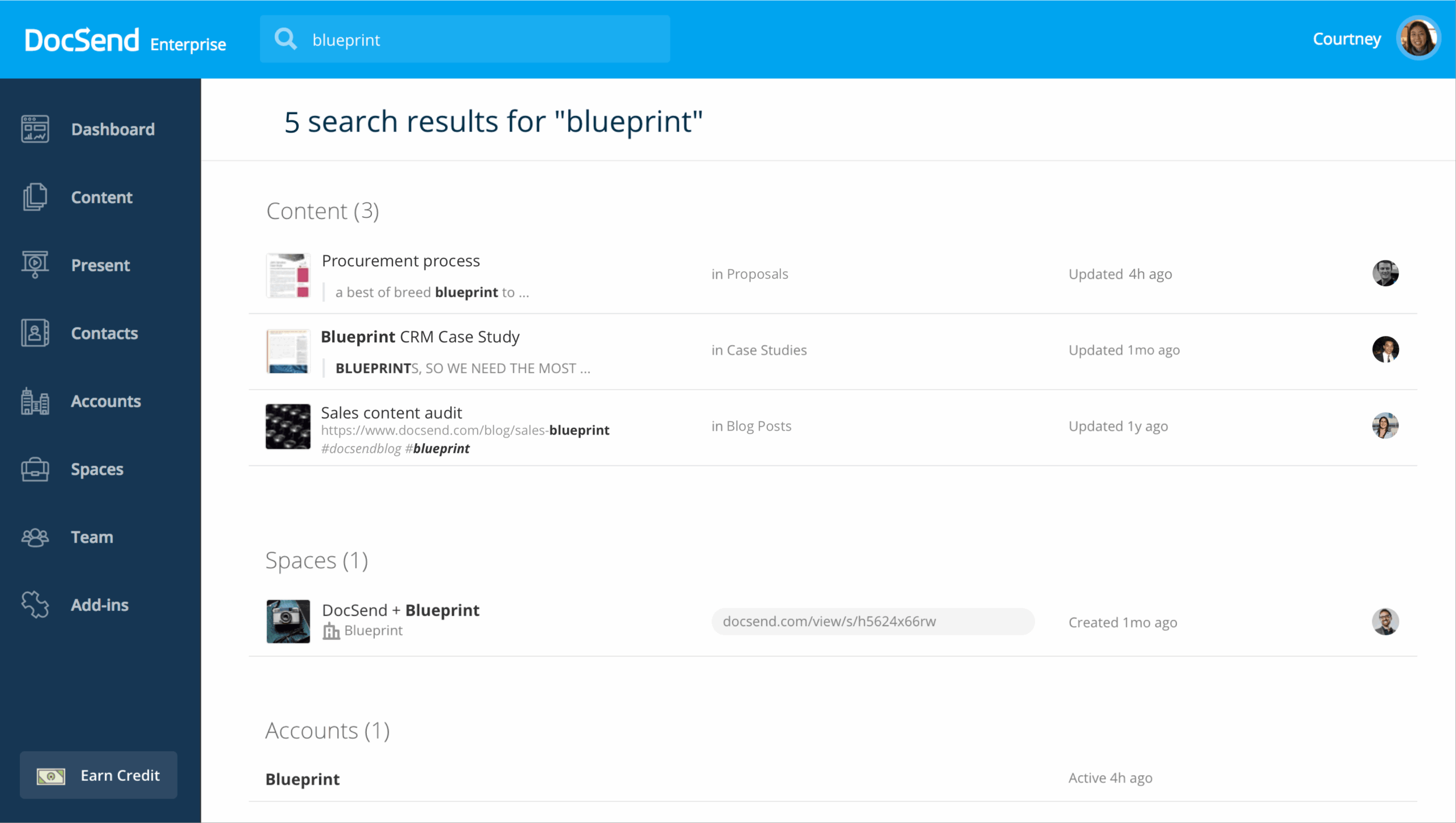
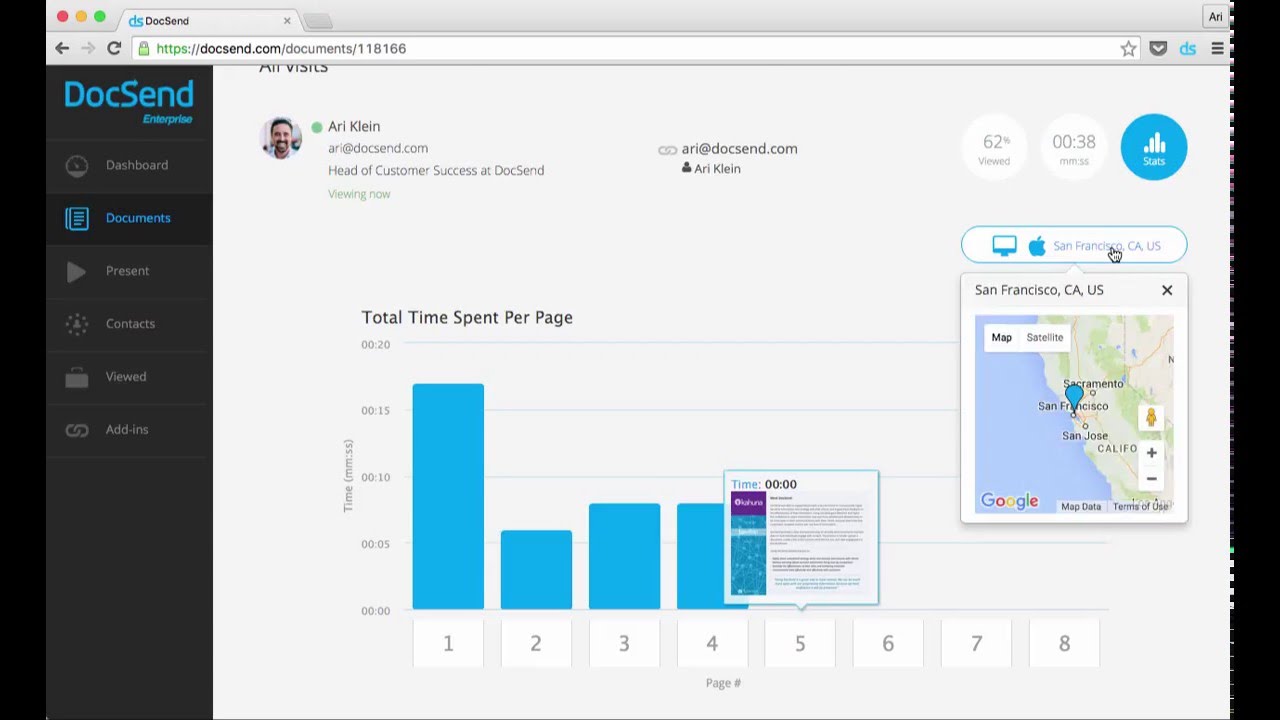
Security features
The DocSend data room is built with advanced features tailored to fast-paced business environments where protecting sensitive information is non-negotiable.
Unlike legacy VDRs that often require juggling multiple tools or technical onboarding, DocSend offers out-of-the-box solutions with user-friendly controls. These features empower financial teams and executive leaders to share documents confidently during critical business transactions.
Key security capabilities include:
- Granular permissions
Administrators can control who can view, download, or forward documents, down to the individual file level. This allows precision control across different stages of the deal and ensures that confidential information is only accessible to authorized parties. - Dynamic watermarking
Every document is protected with a real-time, personalized watermark that includes the viewer’s email and access time. This discourages leaks and helps track unauthorized distribution. - NDA gating
You can gate files behind an automatically enforced non-disclosure agreement. Viewers must sign before gaining access — ideal for investor relations and external due diligence reviews. - Page-by-page insights
Security in DocSend goes beyond access control. Teams can see which sections of a document were read, skipped, or revisited. These real-time, page-by-page insights offer unmatched visibility during high-interest investor interactions or legal reviews. - Link expiration and access revocation
Instantly revoke access or expire a link when a deal falls through or an NDA lapses—without needing to re-upload files. - Secure hosting and encryption
All documents are encrypted with TLS in transit and AES-256 at rest, hosted on Amazon Web Services. While DocSend does not market SOC 2 compliance, its infrastructure benefits from Dropbox’s robust security practices.
By combining simplicity with advanced security features, DocSend enables teams to move faster without compromising control, making it one of the most efficient and secure virtual data rooms available for modern dealmaking.
Docsend data room features
Security
User and data management
Customization
Pricing
DocSend offers a transparent, subscription-based pricing model designed to accommodate businesses of varying sizes and needs. Unlike traditional VDRs that often charge per data room or per user, DocSend provides flat-rate plans with unlimited data rooms and viewers, making it a cost-effective solution for teams managing multiple deals or investor communications simultaneously.
Available plans include:
- Personal – $10/user/month
- Ideal for individuals requiring basic document sharing and tracking capabilities.
- Includes document-level analytics and up to 4 eSignatures per month.
- Standard – $45/user/month
- Suitable for small teams needing multi-file sharing and enhanced analytics.
- Features customizable branding, unlimited eSignatures, and video engagement analytics.
- Advanced – $150/month (includes 3 users)
- Designed for teams requiring advanced security features such as dynamic watermarking, email authentication, and one-click NDAs.
- Provides lightweight data rooms (Spaces) and folder-level security.
- Advanced Data Rooms – $180/month (includes 3 users)
- Offers comprehensive deal control with features like group visitor permissions, data room audit logs, automatic file indexing, and enhanced analytics.
- Doubles the capacity per data room compared to the Advanced plan.
All plans come with a 14-day free trial, allowing users to explore the platform’s features before committing. Annual billing options are available, offering savings of up to 40% compared to monthly billing.
By offering scalable plans with a clear pricing structure, DocSend helps businesses close deals more efficiently without the complexity and costs associated with traditional VDR providers.
Top 3 data rooms software

Overall rating:
4.9/5
Excellent

Overall rating:
4.8/5
Excellent

Overall rating:
4.7/5
Excellent
Unique features
Unlike traditional virtual data rooms built for complex legal workflows, DocSend is designed for speed, simplicity, and insight. It enables startups, investors, and revenue teams to oversee deals more intuitively while retaining control over sensitive content.
- Unlimited data rooms at no extra cost
DocSend lets users create and manage multiple VDRs — called “Spaces”— without additional fees. This is ideal for organizations juggling concurrent transactions or due diligence processes across different audiences. - Page-by-page engagement insights
DocSend provides detailed analytics showing exactly which pages were viewed, skipped, or revisited. This real-time visibility gives teams a competitive edge by helping them identify high-interest investors and optimize follow-ups. - Auto-indexing and branded deal rooms
Folder structures are automatically indexed for easy navigation, and deal rooms can be customized with logos and colors. This improves the experience for external stakeholders and strengthens brand presence during critical business operations. - Document updates without link changes
Teams can update files without needing to resend links — a feature particularly useful when managing dynamic deals or sharing new versions of documents across multiple tools. - Built-in NDA gating and link-level control
Access can be restricted behind pre-approved NDAs, and links can be set to expire or be revoked anytime. These features streamline early-stage diligence while maintaining full control over confidential information.
Customer support
DocSend provides accessible and responsive support to ensure smooth onboarding and effective use of its platform across teams. From early setup to active deal management, users benefit from a mix of self-service and personalized assistance.
- Email support for all plans
Standard support is available via email, with typical response times under 24 hours during business days. - Live chat during business hours
Users on Standard, Advanced, and Data Room plans can access real-time assistance through chat for quick troubleshooting. - Dedicated account managers for enterprise users
Larger clients receive personalized onboarding, optimization guidance, and strategic account support. - Comprehensive knowledge base
An up-to-date help center offers step-by-step tutorials, setup guides, and FAQs for self-service issue resolution. - Webinars and video tutorials
DocSend regularly hosts educational content to help teams navigate features, optimize data rooms, and manage deals more effectively.
Document management
While DocSend doesn’t offer deep document versioning or collaborative editing like some enterprise platforms, its document sharing and control features are effective and user-friendly.
- Drag-and-drop upload
Upload PDFs, DOCX, and presentations with simple drag-and-drop functionality. - Permission control
Assign view-only, download, or no-access permissions per file or folder. - Folder structuring
Organize content in folders for each deal, board meeting, or investor update. - Audit trails
See exactly who viewed which documents and when, including time on page and viewer location. - Link-based access
Eliminate email attachments with secure, trackable links.
Pros and cons
DocSend receives positive feedback from users across various platforms. On G2 and Capterra, the rating is 4.6. The reviews indicate that users appreciate DocSend’s features and performance, with a significant majority expressing high satisfaction.
The most common pros and cons include the following:
- Customization options: the platform’s flexibility allows businesses to tailor VDR to their specific needs.
- Wide range of pricing plans: there are four main pricing plans corresponding to different companies and individuals.
- Integrated eSignature: this feature allows сonverting and creating signable documents within the platform, while easily sharing them with recipients via secure links.
- Reporting and analytics: audit reports for regulated and non-regulated industries
- One-click NDA: This functionality makes it easy to set up NDAs or other agreements for more controlled access to your sensitive content.
- Document analytics: it enables you to gather document-level insights, tracking top-performing pages, average completion percentage, and document version performance.
- No integration with professional and organizational communication services.
- Some users report issues with the UI design and interface.
- No video support.
Clientele and case studies
DocSend is used by startups, VC firms, SaaS platforms, and digital businesses to securely manage fundraising, due diligence, and investor communications. Its appeal lies in its ease of use, security features, and real-time deal insights that help teams make faster, data-driven decisions. Whether it’s a founder managing outreach or a venture firm handling LP reporting, DocSend offers a focused solution for critical business interactions.
Major clients
- Wizard Ventures (Venture Studio)
Wizard Ventures uses DocSend to manage multiple fundraising campaigns across its portfolio of direct-to-consumer brands. With detailed engagement analytics and customizable deal rooms, they were able to prioritize outreach and optimize materials based on investor behavior. The firm reports a 25% boost in fundraising efficiency since implementation. - Capita (SaaS Fundraising Platform)
Capita relies on DocSend to securely share complex PDFs and pitch decks with both investors and clients. Real-time viewer analytics helped them adjust messaging after learning most readers spent only 90 seconds per deck. DocSend also plays a key role in their customer onboarding process, ensuring legal compliance and structured communication. - ff Venture Capital (Venture Capital Firm)
ffVC implemented DocSend to streamline its capital formation process and reduce manual back-and-forth during due diligence. With granular permissions and secure audit trails, the team gained greater control over sensitive investor materials. The VDR’s analytics also enabled them to better identify investor intent and shorten fundraising cycles.
Case studies
- Sleepless Media (Web Development/Creative Agency)
Sleepless Media uses DocSend to securely share creative project proposals and digital assets with clients like Levi’s and Breeo. By leveraging auto-indexed folders and branded data rooms, they enhanced professionalism and reduced back-and-forth during project scoping. - Cour Design (Live Entertainment Design)
Operating in a high-speed, high-stakes industry, Cour Design relies on DocSend to deliver proposals for major artists like Lizzo and Billie Eilish. Real-time document tracking helped them close projects faster while maintaining tight control over sensitive information. - Maor Investments (Investment & Fundraising)
In the financial sector, Maor Investments used DocSend’s security features to support investor communications. The firm reduced risk during deal execution by avoiding manual document sharing methods and consolidating control inside a single secure platform.
These case studies highlight DocSend’s ability to adapt across industries while simplifying complex, security-sensitive document workflows at scale.
Comparison of the top 3 data rooms
|  |  | |
| Details | Check price | Learn more | Learn more |
| General business | |||
| Top use cases | M&A, Finance, Life sciences and healthcare, Energy, Real estate, Tech | M&A, Finance, Legal | M&A, IPO, Capital raising, Healthcare, Real estate |
| What users appreciate | Excellent support, easy-to-use, encryption and security features | Encryption, data analysis tool, support | Reliable support, comfortable platform |
| Features | |||
| Fence view | |||
| Granular access permissions | 8 levels | 4 levels | 5 levels |
| Dynamic watermarking | |||
| Built-in redaction | |||
| Two-factor authentication | |||
| Advanced Q&A | |||
| Automatic reports subscription | |||
| Detailed audit trail | |||
| Auto-notifications about new activity | |||
| Custom branding | |||
| Support | |||
| Live chat | |||
| Email support | |||
| Phone support | |||
FAQs
What is DocSend used for?
DocSend is used for securely sharing and managing sensitive business information. It can be used for due diligence, M&A transactions, fundraising, etc.
Is DocSend owned by Dropbox?
Yes, DocSend was acquired by Dropbox in 2021, further enhancing its capabilities as a virtual data room provider.
How safe is DocSend?
DocSend employs advanced security measures, including SSL/TLS encryption and two-factor authentication, to protect users’ data.
Can I use DocSend for free?
No, DocSend does not offer a free version. Nonetheless, DocSend offers a 14-day free trial to try out its benefits before opting for a paid plan.