
ShareFile is a secure platform that helps organizations manage document workflows, compliance, and remote collaboration. It provides a structured space where you can share files, collect signatures, request information, and coordinate tasks with clients and partners.
The solution is used across industries where secure document exchange and regulated workflows are critical. They include accounting, finance, legal, healthcare, insurance, and real estate.
👀Note: Following the acquisition deal in 2024, ShareFile is now part of Progress, bringing its document-centric collaboration and client interaction platform into the Progress Digital Experience portfolio. This combination allows the new solution to extend its capabilities.
Key additions include workflow automation, secure file sync and share, client portals, and integrated eSignature, complementing Progress’ existing digital experience products such as web and application experiences, personalization, file transfer, and digital decisioning.
Why do business teams look for ShareFile alternatives?
Based on real user reviews on G2 and Capterra from 2025, the main reasons include the following:
- High pricing with limited storage. Users report that the cost is high relative to the storage provided.
- Slow upload times. Large files can take a long time to upload, disrupting workflows.
- Duplicate invoices and account management problems. Users experience repeated billing issues and difficulties making basic changes.
- Access control hiccups. Occasional problems with permissions may cause workflow disruptions, especially when managing shared folders across teams.
Although ShareFile delivers core security and collaboration capabilities, high costs, performance slowdowns, and occasional access-control problems can create friction in day-to-day use. For many teams, these challenges are enough to consider alternatives.
In this guide, you’ll explore:
- Key use cases of ShareFile-style platforms
- What capabilities to evaluate in a secure file-sharing or VDR platform
- How top ShareFile alternatives compare in security, usability, and workflow support
- Pros and cons of each provider based on real user reviews
- How solutions compare by key capabilities
- A quick checklist to help you choose the right solution
Popular data rooms for M&A

Overall rating:
4.9/5
Excellent

Overall rating:
4.8/5
Excellent

Overall rating:
4.7/5
Excellent
Core use cases for ShareFile-style platforms
Common scenarios include the following:
1. Secure file sharing and collaboration
Teams store all sensitive documents in a single workspace, with permissions set by role or project so only authorized users can access and edit files. This structure keeps collaboration organized and ensures everyone works on the latest version.
Key advantages include:
- Reduced time spent searching for files or confirming updates
- Improved communication across departments
- Stronger collaboration culture and confidence in sharing sensitive information
- Automatic tracking of changes that maintains visibility and control
2. Client and vendor document exchange
Organizations send and receive files from clients, contractors, and suppliers through secure portals instead of email attachments. Protected links and private folders keep files secure, organized, and accessible.
Key advantages include:
- Quick adaptation for external collaborators
- Automatic notifications when new documents arrive
- Fewer follow-ups and prevention of lost or outdated files
- Strengthened trust with clients and vendors
- Simpler, more predictable internal and external workflows
3. Regulatory compliance and audit logging
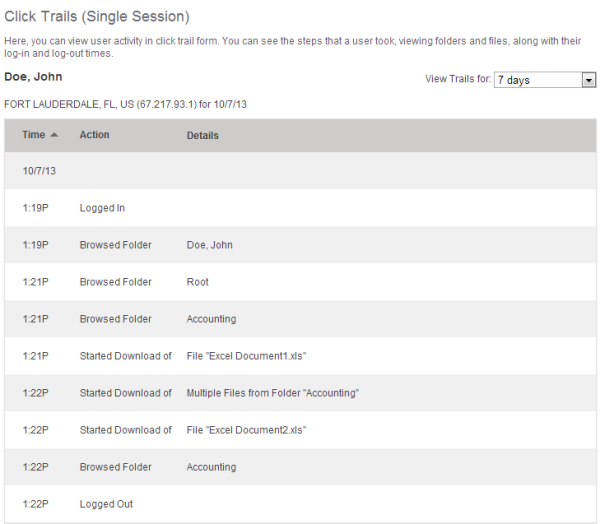
The platform logs every document action, including uploads, downloads, views, and edits. It creates a detailed audit trail that supports internal reviews and regulatory reporting.
Key advantages include:
- Early detection of potential issues
- Verification that sensitive information is handled correctly
- Efficient response to regulatory requests
- Transparent records that simplify audits
4. Workflow automation and secure access controls
Solutions automate routine processes such as document routing, approvals, and task assignments. Role-based access, in turn, ensures users handle only relevant files.
Key advantages include:
- Fewer delays and errors, even across multiple approvals
- Team focus on higher-value work
- Progress tracking in real time
- Predictable and efficient workflows
5. Due diligence and confidential transactions
During high-stakes deals, these platforms act as virtual data rooms. Users can organize documents in secure spaces with granular permissions for each stakeholder. Advisors, buyers, and investors see only relevant files, while managers maintain full oversight.
Key advantages include:
- Real-time tracking to respond quickly to questions and requests
- Structured workflows, even with hundreds of sensitive documents
- Efficient movement of critical decisions
- Maintained security and transparency throughout the deal lifecycle
By centralizing documents, controlling access, and tracking activity, these tools make complex processes more efficient, transparent, and secure.
Criteria for evaluating ShareFile alternatives
Below, we highlight some of the key features and capabilities teams typically look for in data rooms to give you a clear starting point for evaluation.
1. Security and encryption
Advanced platforms combine strong encryption standards with granular controls that govern access, visibility, and document use at every stage.
Key security capabilities to look for include the following:
- Granular access control, such as multiple document permission levels, role and group management, and the ability to preview files as other users see them
- Dynamic protection mechanisms, including intelligent redaction and customizable watermarks that deter data leakage
- Strict identity controls, including two-step authorization and email verification
- Access restrictions based location that define from where data can be accessed
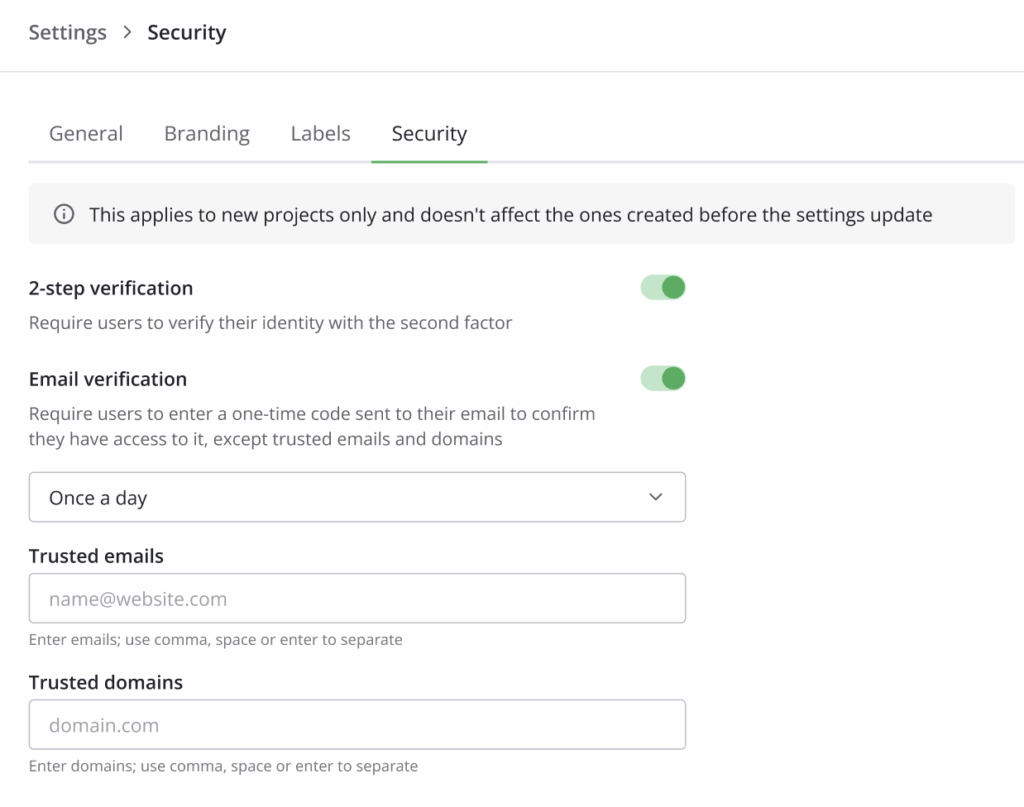
These features allow organizations to protect documents at rest and in transit throughout their entire lifecycle.
2. Usability and interface
Since a secure platform needs to support fast-moving teams, modern solutions focus on usability that holds up during audits, deals, and high-pressure collaboration.
Key usability and interface capabilities to look for include the following:
- Intuitive navigation and onboarding, allowing internal teams and external stakeholders to get productive without extensive training
- Structured project navigation, such as due diligence checklists that guide users through complex reviews
- In-document collaboration, with comments, annotations, and notes available in documents
- Dashboard and progress overview, providing an at-a-glance view of ongoing tasks, document status, and outstanding actions so teams can navigate projects without confusion
Clear data room navigation and centralized collaboration reduce confusion and help all participants stay aligned throughout everyday workflows and transactions.
3. Workflow automation and Q&A management
Platforms designed for complex transactions have to support structured communication and automated processes.
Key capabilities include the following:
- Auto data indexing, which organizes documents automatically as they are uploaded, saving time and keeping projects structured
- Advanced Q&A workflows, enabling users to ask questions, assign approvers, and track responses clearly
- Built-in e-signature, allowing approvals and signatures to be completed securely within the platform
- Task and workflow automation, streamlining routine steps such as document routing, review assignments, and deadline notifications
By automating repetitive processes and centralizing communication, teams can focus on critical decisions and maintain full visibility and accountability throughout the workflow.
4. Specialized features for complex projects
Some use cases demand more than a single shared workspace. Therefore, platforms designed for enterprise or deal-driven environments include features that support scale and control.
Advanced capabilities to consider for complex projects include the following:
- Multi-project management, allowing teams to oversee several workstreams or transactions at once
- Custom branding, which creates a consistent and professional experience for external users
- Detailed audit trails, providing insights into document activity, user engagement, and workflow efficiency to support informed decision-making
- Screenshot prevention and fence view, adding another layer of protection against unauthorized capture
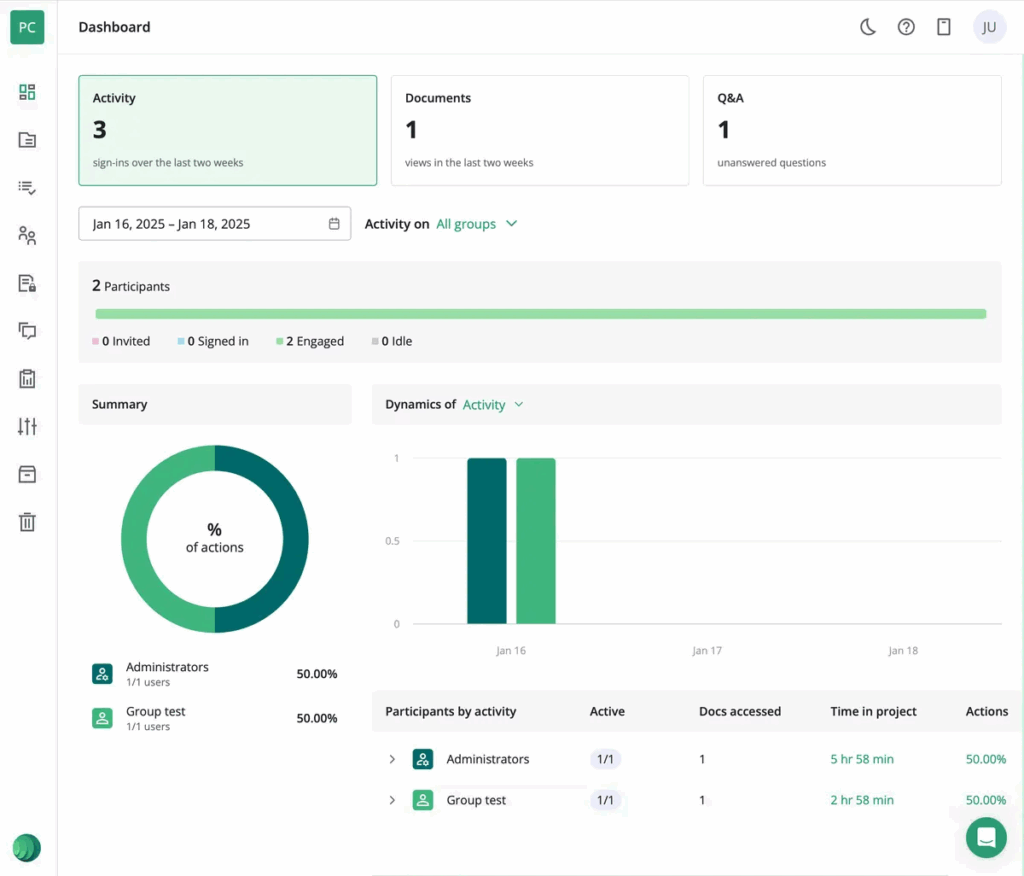
Audit trail example
These features become especially important in due diligence, audits, and other high-stakes scenarios where structure and control affect outcomes.
5. Integrations
Therefore, platforms should connect with Microsoft 365, Google Workspace, Slack, and CRM systems so that teams can share data and collaborate without switching between multiple tools.
Integrations offer the following key benefits that make collaboration, security, and project management more efficient:
✔️ Seamless workflows across tools
✔️ Time saved with automation
✔️ Real-time team and partner collaboration
✔️ Accurate, up-to-date documents
✔️ Activity tracking for visibility and compliance
✔️ Easy scaling for teams and projects
✔️ Secure interactions for clients and partners
Seamless integrations keep collaboration smooth and reduce friction across existing workflows.
6. Pricing and scalability
Flexible pricing and scalable plans allow organizations to pay for only what they need while adapting as projects and teams grow.
Small and medium businesses can start with entry-level plans that provide core file sharing, secure storage, and basic collaboration features. As teams expand or projects become more complex, solutions should support higher storage limits, multiple data rooms, advanced workflow automation, granular permissions, and full virtual data room capabilities for enterprise or deal-focused use.
The table below provides a quick overview to help you compare options and identify the right fit for your organization.
| Plan | How providers charge | Best for |
| Per-page | Charges based on the total number of pages uploaded to the data room | Small-sized transactions with limited documents |
| Per-user | Charges for every user invited, including stakeholders and collaborators | Small to medium teams with a predictable number of users |
| Storage-based | Charges according to the amount of data stored | Teams managing large files |
| Flat monthly fee | Fixed fee covering users and storage, usually billed monthly, quarterly, or annually | Large-scale deals or enterprise teams with complex, high-volume projects |
With these criteria in mind, the next step is to compare leading ShareFile alternatives and see how they measure up across these capabilities.
Leading ShareFile alternatives
In this section, we highlight some of the best alternatives, summarize their pros and cons based on the latest user reviews, and provide a comparison of the key features that business teams rely on for secure collaboration, workflow management, and complex projects.
1. Ideals VDR
Ideals VDR is an intuitive platform for global teams, offering mobile and desktop apps and a multilingual interface. Independently rated as the best product and service for four consecutive years, it meets top security standards to protect sensitive data and collaboration.
What users like:
- Easy-to-use interface
- Visual dashboards for tracking engagement
- Strong customer support
- Secure data sharing
- User-friendly experience across devices
What users dislike:
- Billing process can be lengthy
- Cost may feel high for some users
Read more user reviews about Ideals VDR here.
2. Box
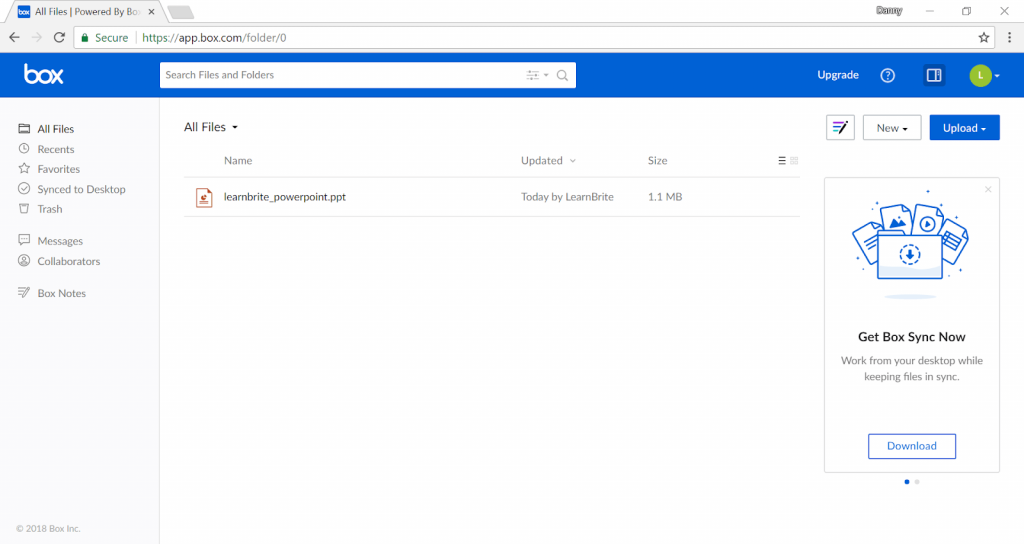
Box is an AI-powered content platform combining workflow automation, intelligent insights, and robust security. It integrates with over 1,500 apps and is trusted across finance, technology, and life sciences.
What users like:
- Unlimited storage and seamless integration with favorite apps
- Strong security features
- Easy file sharing
What users dislike:
- Upload speeds can be slow for large files
- The platform can feel clunky at first
Read more user reviews about Box here.
3. Ansarada
Ansarada supports M&A, audits, and high-stakes projects with AI-driven insights, advanced Q&A, automated workflows, and 24/7 expert support. It offers free preparation and transparent pricing.
What users like:
- Easy access control
- Efficient Q&A functionality
- Real-time insights and accurate deal predictions
What users dislike:
- Initial setup can be tricky
- Slow processing of large data volumes
Read more user reviews about Ansarada here.
4. Onehub
Onehub provides secure file sharing with bank-level encryption and role-based access. Virtual data rooms, client portals, and branded workspaces help businesses manage and share critical files confidently.
What users like:
- Excellent customer support
- Ease of use
- Secure file sharing
What users dislike:
- Minor interface quirks
- Setup may require hands-on assistance
Note: These are 2024 reviews. There aren’t more recent user reviews publicly available for this provider.
5. Egnyte
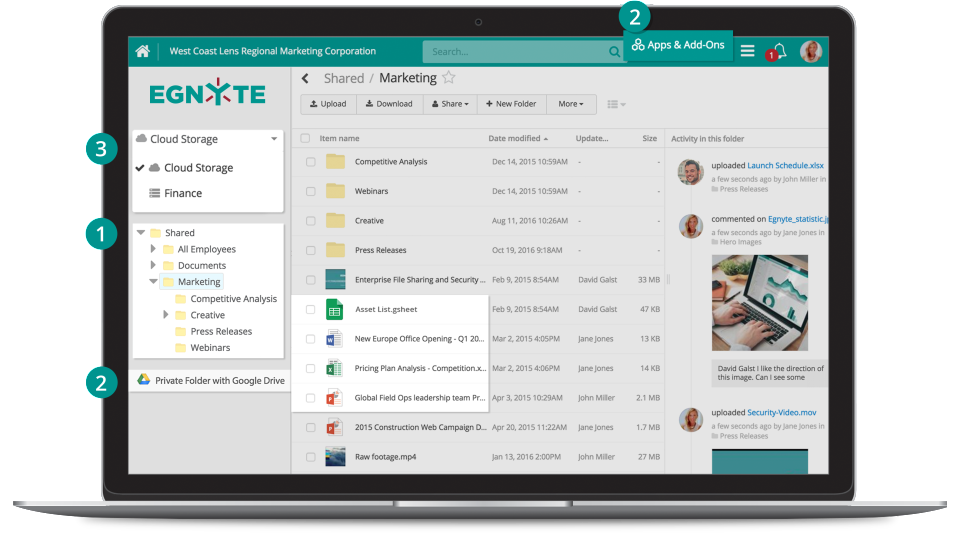
Egnyte delivers cloud and on-premises content collaboration with AI, automation, and governance tools. It serves regulated industries and helps teams protect data, streamline processes, and unlock content value.
What users like:
- Easy remote access to files
- Organized file management
- Easy to set up and onboard users
What users dislike:
- Limited effectiveness when multiple users work on the same file
- Task automation and integrations could be improved
Read more user reviews about Egnyte here.
The table below compares ShareFile and its best alternatives by functionality, user ratings, and security standards, helping readers assess which solution best fits their operational and compliance needs.
| ShareFile | Ideals VDR | Box | Ansarada | OneHub | Egnyte | |
| G2 user rating (out of 5.0) | 4.1 | 4.7 | 4.2 | 4.5 | 4.2 | 4.5 |
| UpGuard security rating (out of 950) | 941 | 948 | 904 | 804 | 727 | 866 |
| Value for money (on Capterra) | 4.1 | 4.5 | 4.3 | 4.2 | 4.3 | 4.1 |
| 2FA | ✔️ | ✔️ | ✔️ | ✔️ | ✔️ | ✔️ |
| Granular permissions | ✔️ | ✔️ | ✔️ | ✔️ | ✔️ | ✔️ |
| IP-based access restriction | ✔️ | ✔️ | ✔️ | ✔️ | ✖️ | ✔️ |
| “View As’ mode | ✖️ | ✔️ | ✖️ | ✔️ | ✔️ | ✖️ |
| Screenshot prevention | ✖️ | ✔️ | ✖️ | ✖️ | ✖️ | ✖️ |
| Built-in redaction | ✖️ | ✔️* 21 file format support with AI-powered search | ✔️ | ✔️ | ✖️ | ✖️ |
| Due diligence checklist | ✖️ | ✔️ | ✖️ | ✔️ | ✖️ | ✖️ |
| Auto data indexing | ✔️* unavailable for > 10,000 items | ✔️ | ✖️ | ✔️ | ✔️ | ✔️* currently supported up to 5 folder levels |
| E-signature | ✔️ | ✔️ | ✔️ | ✖️ | ✔️ | ✔️* signature requests aren’t supported on mobiles and tablets |
| Q&A with auto question assignment | ✖️ | ✔️ | ✖️ | ✔️ | ✖️ | ✖️ |
| Multi-project management | ✖️ | ✔️ | ✖️ | ✖️ | ✖️ | ✖️ |
| Detailed audit trails | ✔️ | ✔️ | ✔️ | ✔️ | ✔️ | ✔️ |
| Custom branding | ✔️ | ✔️ | ✔️ | ✔️ | ✔️ | ✔️ |
Note: This table summarizes key features of each platform based on publicly available information from official websites. Some features may not be disclosed, and providers may introduce new capabilities or updates over time. For the most accurate and up-to-date details, check each vendor’s official documentation or contact their support.
Verdict: Based on the features, usability, and security capabilities analyzed, Ideals VDR stands out as a comprehensive, user-friendly, and secure solution suitable for complex projects and global teams. Other providers also offer strong functionality, but Ideals combines advanced security, workflow automation, and intuitive design, making it the most feature-rich option overall.
How to choose the right alternative
This checklist is designed to guide you quickly through the most important considerations. By answering a few simple questions about your team’s needs, you can identify which solutions are best suited to keep work efficient, secure, and well-organized.
1. Workflow type
- Are your projects routine internal collaboration or high-stakes/confidential?
- Guidance:
- Mostly internal team work → standard cloud platforms (Box, Egnyte) are usually sufficient.
- Sensitive deals, audits, or regulated data → choose a secure platform (Ideals, Ansarada, Onehub).
2. Security and compliance
- Does the platform provide role-based access, audit logs, redaction, and IP-based access restrictions?
- Guidance:
- Low-risk data → basic functionality may be enough.
- High-risk data or regulated industries → ensure the provider offers advanced security measures.
3. Usability and onboarding
- Can internal teams and external stakeholders start using such platforms instantly?
- Guidance:
- Teams are tech-savvy → you can opt for platforms that may require more training, provided they offer robust dashboards and strong inline collaboration tools.
- Mixed experience levels → choose platforms with intuitive navigation, due diligence checklists, and in-document Q&A for guidance.
4. Pricing and scalability
- Does the pricing model match your team size and document volume?
- Guidance:
- Small team, low volume → per-user or per-page plans may suffice.
- Large team, multi-project or high-volume → consider flat-fee or storage-based models to control costs.
5. Specialized features
- Do you need advanced tools like auto data indexing, e-signature, multi-project management, detailed analytics, or Q&A workflows?
- Guidance:
- Simple projects → may not need these features.
- Complex or high-stakes projects → choose advanced solutions that improve efficiency, oversight, and collaboration, reducing risk and errors.
This approach helps you narrow down options confidently, so you can select a platform that keeps projects secure, efficient, and scalable.
Conclusion
While ShareFile is a reliable choice for secure file sharing and collaboration, there are alternatives depending on your needs. They range from enterprise-grade file governance solutions such as Box and Egnyte to secure platforms for high-stakes transactions like Ideals and other VDRs.
Choosing the right option comes down to your priorities: how sensitive your data is, how complex your workflows are, and your budget.
Related posts

01 April 2026
Ideals Alternatives in 2026: Which VDR Is Right for Your Deal?
Ideals virtual data room has built a strong reputation in the industry. But no single platform fits every team, deal...

03 March 2026
What Is a Virtual Data Room? Definition & Key Security Features
According to Ernst & Young’s survey conducted among American board directors, cybersecurity and data privacy were among the top five...

25 February 2026
Ultimate Guide to Virtual Data Room Security: Protect Data with Ease
A virtual data room (VDR) is an online platform where businesses securely store and share sensitive documents during mergers and...