
M&A experts highlight that the industry is evolving, despite the drop in deal quantity. According to the PwC 2025 M&A outlook, over half of U.S. companies actively pursue deals, even in this uncertain market. For private equity and corporate teams, it’s a sign that transformation is still the name of the game.
The report indicates that as AI reshapes numerous industries and new players shift the competitive landscape, dealmaking has become a survival tool rather than just a growth strategy.
The next wave of M&A will be faster, more intelligent, and more disruptive than ever. In this case, time and clarity are key to any M&A deal. With a well-designed data room, dealmakers can speed up the due diligence process and avoid delays, confusion, and risk.
Whether you’re on the sell side preparing disclosures, on the buy side digging into details, or advising as legal, financial, or IT counsel, the right data room setup will help everyone move faster and with more confidence. This guide will show you how to set up your virtual data room for your whole deal team.
Why structured virtual data rooms matter in M&A?
Time and trust are essential aspects of a successful M&A deal. A messy data room can slow things down, or even ruin the deal. If files are missing, poorly named, or hard to find, it slows down the due diligence process and frustrates buyers. It also makes your company look unprepared or disorganized, which can damage trust.
According to a 2024 study by Bayes Business School, due diligence times have increased by 64% over the last 10 years. Average timelines went from 124 days in 2013 to 203 days in 2023. Why? M&A professionals point to growing regulatory demands (like GDPR), ESG scrutiny, geopolitical risk, and the sheer volume of data in modern deals. As a result, buyers are spending more time and resources reviewing documents. And they expect sellers to meet them halfway.
Buyers want seamless access, clear structure, and reliable performance. When these expectations go unmet, it delays due diligence and erodes trust within hours, not weeks.
On the other hand, a well-structured virtual data room keeps due diligence moving, protects confidential documents, and builds trust between buyers and sellers. Here’s why it matters.
Speeds up due diligence
Buyers need to access key documents such as financials, contracts, IP, HR data, and tax records quickly. A clean data room folder structure with logical document organization and searchable file names saves hours of back and forth.
For example, if a buyer can find audited financials from the last 3 years instantly, they are more likely to stay engaged and move forward with confidence. Less time hunting means more time progressing with the deal.
Boosts professionalism
An organized virtual data room reflects how prepared and serious the seller is. A thoughtful data room structure shows the sell side has anticipated buyer questions and done the work upfront.
In fact, a clear data room structure sets the tone for how the rest of the process will go. If the buy side can access documents anytime with no delay, this means the deal will go faster. In competitive processes, this can help the target company stand out and speed up buyer decisions.
Reduces data leaks
Sensitive files like employee contracts, litigation records, or IP documents need to be locked down. Structured virtual data rooms keep data safe with permission settings, watermarking, and expiring links.
These security features prevent data download or sharing beyond intended parties. This means less risk of breaches and reputational damage.
Supports compliance & audits
Buyers and legal teams need to verify documents for compliance, tax, or regulatory purposes. A tidy data room makes it easy to show what was shared, when, and with whom. Features like audit trails and activity logs make post-deal audits or investigations much simpler.
Builds trust with stakeholders
When everyone from legal advisors to investors can see what’s in the data room and how it’s managed, it’s transparent. That builds trust on both sides of the table.
In high-stakes or cross-border deals, buyers often rely heavily on the data room to understand the business without being on-site, as in the case with traditional data rooms. If the specific documents are hard to access or unclear, it creates doubt and slows everything down. But when the data room is well-structured and transparent, it builds confidence and helps the deal move forward. In these cases, trust is what keeps momentum going.
Data rooms for M&A

Overall rating:
4.9/5
Excellent

Overall rating:
4.8/5
Excellent

Overall rating:
4.7/5
Excellent
Step-by-step framework to build a data room structure
A well‑structured data room is the backbone of effective M&A. Here, we explore the key steps to structure a data room for faster due diligence and better transparency.
Step 1: Draw a visual schema
Start with the big picture. Before uploading a single file, outline how the virtual data room should look:
- Sketch a folder hierarchy before uploading any files.
- Identify key sections (Financials, Legal, Operations) and subcategories (Tax Filings, Contracts, Intellectual Property Rights).
- Define which stakeholders (investors, legal teams, management) need access to each section.
Use flowchart tools like Lucidchart or Miro to visualize the structure. This early planning avoids clutter and confusion later.
Step 2: Assign permissions thoughtfully
Not everyone should see everything. Virtual data room solutions allow users to set up user groups and control who can view, download, or edit files. For example, investors might only need read-only access to financials, while your internal legal team needs full control over sensitive documents.
Here is how to set up access permissions:
- Create user groups (“Investors,” “Legal Advisors,” “Management”).
- Set granular permissions (view-only, download, edit) based on roles.
- Lock sensitive folders, such as HR and litigation, for internal use only.
- Use dynamic watermarking to secure downloaded files.
Step 3: Create a logical folder system
Make it easy to find what matters. Structure all the folders by clear, intuitive categories like Finance, Legal, Employees, Corporate Structure, Contracts, IP, and Product. Inside each folder, break it down further by year, project, or topic. Include a “General” folder for NDAs, teasers, and process overviews.
To simplify the process, use a virtual data room index. A data room index acts as a table of contents. It gives a quick overview of what’s available and where to find it.
Indexing helps everyone stay aligned, reduces back-and-forth questions, and ensures nothing important gets overlooked. Also, you can mirror the structure of your company’s internal documentation for consistency.
Step 4: Standardize naming & indexing
Keep everything searchable and consistent. A messy naming system slows everyone down. Set rules like “Department_DocumentType_Date” (eFinance_PnL_2024_Q2.pdf).
Use tags if your data room allows it. This way, teams can quickly search, sort, and cross-reference files. For even more streamlined collaboration, include a “README” file that explains naming rules.
Step 5: Upload & maintain documents
Don’t dump files — curate them. Bulk upload tools can save time, but they only work if your files are pre-sorted and well-labeled. Upload everything to the correct folder from the start to avoid duplicates and confusion.
Also, make sure to keep the data room fresh. Regularly update key documents, like financial statements, contracts, or cap tables. If something major changes, let stakeholders know right away, don’t leave them guessing. A quick weekly check-in can help catch outdated files before they cause delays.
It is better to treat the data room like a live environment, not a one-time upload.
Step 6: Track user activity & engage Q&A
Most data rooms offer activity tracking, so use it. See who’s viewing which documents and for how long. If buyers or advisors aren’t opening critical folders, it could signal confusion or hesitation. Here are the key steps to perform at this stage:
- Monitor which files are viewed/downloaded most.
- Follow up if critical sections (e.g., financials) are ignored.
- Use built-in Q&A tools to centralize due diligence questions.
- Assign someone to respond to Q&A within 24 hours.
A data room is a strategic tool to guide the buyer to a “Yes”. Companies can use this framework to speed up due diligence, reduce risk, and keep the deal moving.
Virtual data room checklist for M&A
A well-prepared data room means M&A transactions happen faster with fewer surprises. Whether you’re on the sell-side trying to build confidence or on the buy-side digging into the details, structure, and completeness matter.
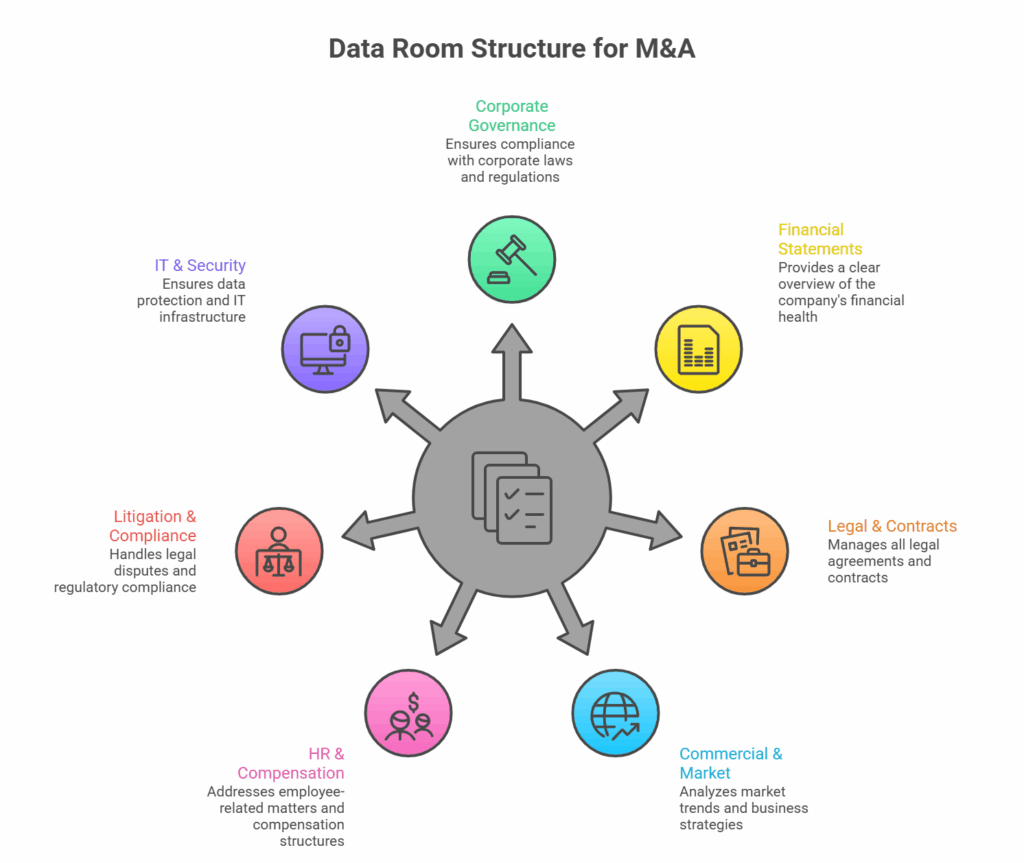
Below, we share a universal checklist to help you get started. It covers the key folders and documents that most legal, financial, and strategic teams expect to see. You can customize the list based on your company size, industry, and deal type.
1. Corporate governance
The following due diligence documents prove legal standing, ownership, and decision-making authority:
- Articles of incorporation
- Bylaws & shareholder agreements
- Board & committee meeting minutes
- Ownership structure (cap table, shareholder list)
- Business licenses and permits
2. Financial statements & tax
During complex financial transactions like M&A, sellers should provide financial documents that ensure financial health and tax compliance:
- Audited financial statements for the last 3-5 years
- Tax returns and filings
- Annual/ quarterly financial reports
- Debt and loan agreements
- Financial projections and budgets
3. Legal & contracts
Legal documents and contracts are essential as they disclose obligations, risks, and third-party agreements. In due diligence data rooms, sellers share:
- Customer and supplier contracts
- Leases (real estate, equipment)
- Intellectual property registrations, such as patents, trademarks, and copyrights
- Partnership/JV agreements
- Non-disclosure agreements (NDAs)
4. Commercial & market
To demonstrate market position, customer base, and growth potential, it is advisable to showcase:
- Customer list and sales pipeline
- Pricing strategy and discount policies
- Market research and competitive analysis
- Marketing and sales materials
- Key partnerships and distribution agreements
5. HR & compensation
HR documentation is another key area of M&A due diligence. The list of documents includes, but is not limited to:
- Employee contracts and offer letters
- Benefits plans (health, retirement, bonuses)
- Organizational charts and headcount data
- Non-compete and severance agreements
- Labor disputes or complaints (if applicable)
6. Litigation & compliance
To disclose legal risks and check regulatory adherence, buyers need to check the following key details:
- Active/pending litigation
- Regulatory compliance reports
- Environmental and safety audits
- Past settlements or disputes
- GDPR/data privacy compliance (if applicable)
7. IT & security
These documents help to assess tech infrastructure and cybersecurity risks:
- Software and hardware inventory
- IT policies (data protection, access controls)
- Cybersecurity and breach history
- Disaster recovery plans
- API and third-party integrations
Virtual data room security & compliance best practices
In 2025, the average cost of a data breach is $4.44 million, according to the IBM report. This is a serious deterrent to sloppy data handling. During M&A transactions, both buy-side and sell-side agents share highly sensitive information. All the documents need to stay protected every step of the way. Here is how most virtual data rooms provide security and compliance for their users.
1. Robust data protection measures
Bank-grade encryption:
- Files are encrypted with AES-256 or higher. This keeps data safe both at rest and in transit.
- Secure data sharing with expiring links and authentication to download files.
Dynamic watermarking:
- Prevent leaks by auto-applying user-specific watermarks (name, IP, date) to viewed/downloaded files.
- Works for PDFs, spreadsheets, and presentations.
Two-factor authentication (2FA):
- Mandate 2FA for all users (SMS, email, or authenticator apps).
- Restricts access even if passwords are compromised.
2. Compliance with key frameworks
General Data Protection Regulation (GDPR):
- Required for EU deals or if handling EU citizen data.
- Ensures right to erasure, data portability, and breach notifications.
SOC 2 Type II Certification:
- Validates cloud security, availability, and confidentiality.
- Preferred for financial, legal, and healthcare transactions.
ISO 27001 Certification:
- Global standard for information security management.
- Demonstrates risk mitigation and systematic data protection.
3. Activity monitoring & audit controls
Detailed audit logs:
- Track who accessed, viewed, printed, or downloaded files.
- Timestamp all actions for legal defensibility.
Real-time alerts:
- Get notified of suspicious activity ( bulk downloads, unauthorized access attempts).
Permission-based access:
- Assign role-based permissions (view-only, download, edit).
- Restrict sensitive folders (HR, legal) to select users.
Overall, a good data room should feel as secure as a bank vault, while still being easy to access documents and download them. These security measures protect the sensitive data, show professionalism, and build trust with buyers and advisors.
Virtual data room provider features to consider
Not all virtual data rooms are built the same. The right provider should make your workflow smoother, not more complicated. Here’s what to look for when choosing a platform for the M&A deal:
| Feature | Description | Data room providers offering this |
| Automatic document indexing | AI-powered document sorting & folder structuring | Ideals, Ansarada, Merrill Datasite, Intralinks |
| Drag-and-drop upload | Bulk upload files/folders with ZIP support | Ideals, Firmex, Box Virtual Data Room, SecureDocs |
| Advanced search | Full-text search (PDFs, scans) + filters by metadata | Ideals, Ansarada, DealRoom, Intralinks |
| Analytics dashboard | Track user activity (views, downloads, time spent) | Ideals, Ansarada, Merrill Datasite, Firmex |
| Q&A module | Centralized question tracking with deadlines | Ideals, Firmex, DealRoom, Intralinks |
| Document requests | Buyers can request files; admins approve/deny | Ideals, Ansarada, Merrill Datasite |
| Version control | Track document changes with timestamps | Ideals, Intralinks, Firmex, SecureDocs |
| Custom branding | White-label UI with company logo/colors | Ideals, Ansarada, Merrill Datasite |
| Bank-grade encryption | AES-256 encryption (at rest & in transit) | All major providers (Ideals, Intralinks, Firmex, Ansarada, Merrill, etc.) |
| Dynamic watermarking | User-specific watermarks on viewed/downloaded files | Ideals, Firmex, Intralinks, SecureDocs |
| GDPR/SOC 2 compliance | Certified data protection frameworks | Ideals, Intralinks, Merrill Datasite, Ansarada |
| Remote shredding | Revoke access to downloaded files post-deal | Ideals, Firmex, Intralinks |
Conclusion: How virtual data room structure drives deal success
Unlike physical data rooms, online data room solutions are more accessible, searchable, and scalable. A good data room structure helps to move through any deal with confidence. It shows buyers that you’re organized, serious, and ready for scrutiny.
Clear folder hierarchies, consistent file naming, and a complete data index reduce confusion and repetitive questions. When buyers don’t waste time chasing missing files or unclear labels, the whole process runs smoothly.
Choose a reliable software to keep your files safe, organized, and easy to access during mergers and acquisitions. Taking the time up front pays off in speed, safety, and confidence in the future.
Here are some must-have virtual data room features to look for:
- Bank-grade encryption and two-factor authentication
- Granular access controls
- Full-text search, tagging, and smart indexing
- Activity tracking and audit logs
- Built-in Q&A and document request tools
- Drag-and-drop uploads and version control
- Customizable dashboards and branded interface
Related posts
23 March 2026
M&A Data Room Structure: Tips and Checklist
M&A experts highlight that the industry is evolving, despite the drop in deal quantity. According to the PwC 2025 M&A...

10 March 2026
A Complete Due Diligence Checklist: Template to Use in 2026
Whether you are a manager preparing for a merger or a finance professional seeking to enhance your knowledge, it is...

03 March 2026
What Is a Virtual Data Room? Definition & Key Security Features
According to Ernst & Young’s survey conducted among American board directors, cybersecurity and data privacy were among the top five...